
DustClear Go
Euro UKTools
4.61.00 Reviews
- Version
- 1.0.4
- Installs
- 10.00K
- Age Rating
- Everyone
Screenshots

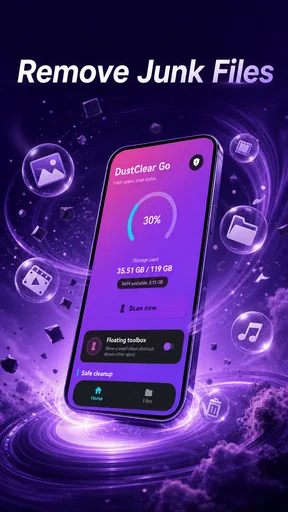

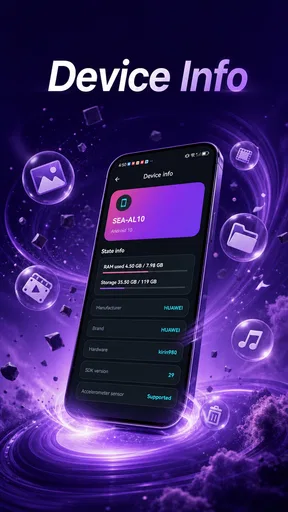
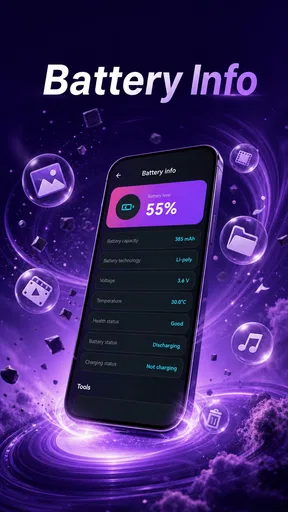
Our Review of DustClear Go
 Analysis by Appyee
When I first opened DustClear Go, I understood its appeal immediately: it is a small tools app built around a practical question many Android users ask but rarely answer properly—what is taking up space, what information is sitting in cached data, and how is the phone behaving right now? Instead of presenting itself as a broad “make your phone faster” solution, it focuses on checking cached data and viewing device and battery details in one place.
That narrower purpose is important. I would not treat it as a magic performance booster, and I would not install it expecting a complete file manager or a full security suite. I see it as a quick inspection tool: something I can open when storage feels tighter than usual, when battery behavior seems odd, or when I want a clearer snapshot of the phone before deciding what to do next.
DustClear Go is a free Android app from Euro UK in the tools category. It is rated for Everyone, so its basic audience is broad, and the current release is version 1.0.4. The app has reached over ten thousand installs and holds a 4.6 average from eighteen ratings, which suggests a positive early reception while also reminding me that it is still a relatively small app rather than a long-established household name.
Why cached data is the right capability to focus on
The most useful idea here is not “clean everything.” It is checking cached data before making a storage decision. Cache files are temporary pieces of information created by apps so they can load repeated content faster. Over time, those files may become less useful, especially when an app has been updated, rarely used, or filled with images and other temporary material.
That does not mean every cached file is waste. Clearing cache can make an app rebuild temporary content, which may lead to slower loading the next time it starts. For that reason, I prefer an app that helps me inspect the situation rather than encouraging blind cleanup. DustClear Go fits that mindset better than the kind of tool that treats every occupied megabyte as a problem.
In everyday use, this distinction changes how I approach storage. If my phone is nearly full, I first look for the source of the pressure. A cache check can point me toward an app that has accumulated unusually large temporary data, but it does not replace the more important work of reviewing videos, downloads, duplicate photos, or apps I no longer use. The value is in giving me another piece of evidence before I remove anything.
This makes the app especially relevant for people who regularly use streaming, shopping, social, or browser-heavy applications. Those apps can create temporary files as part of normal use. A cache-focused view can help me decide whether a cleanup is worth the inconvenience, rather than treating routine phone activity as damage that must constantly be repaired.
What the device and battery view adds
The second half of the experience is the device and battery information. This matters because storage and battery complaints often arrive together, even though they have different causes. A phone may feel sluggish because it is low on free space, while a battery may be draining because of screen time, mobile signal, background activity, or an aging battery. Looking at both areas encourages a more careful diagnosis.
I find this combination more useful than a cache checker standing alone. If I notice that the phone is warm and the battery is dropping quickly, I do not automatically blame temporary files. I can use the device details as context and then check which app or behavior deserves attention. The app does not need to solve every cause to be helpful; sometimes a clear snapshot is enough to stop me from taking the wrong action.
A practical habit is to check the information at two different moments: once during ordinary use and again when the phone is behaving unusually. The comparison can be more informative than a single glance. For example, I might look before a long commute, then check again after using navigation, streaming, and messaging. That gives me a personal baseline, even though it does not turn the app into a laboratory diagnostic tool.
How DustClear Go fits into a normal phone routine
I would use the app in short sessions rather than leave it open all day. After installing it, my first step would be to review the available cache information and device details without immediately clearing anything. That first pass helps me understand what the app is showing and prevents an impulsive cleanup based only on the presence of temporary data.
When storage is becoming uncomfortable, I would use DustClear Go as a triage screen. If cached data appears to be a meaningful part of the problem, I can consider clearing it selectively or continue with Android’s own app settings for more control. If the cache is not the main issue, I would move on to large media files and unused applications instead of repeatedly refreshing the cleaner.
This workflow is one of the app’s strongest practical lessons: inspect first, clean second. It sounds simple, but many cleanup utilities reverse that order. They put the removal button at the center and make the user feel that a bigger number automatically means a better result. A more restrained approach is safer for people who do not want to sign back into apps, wait for content to reload, or lose locally stored temporary material.
I would also avoid using cache clearing as a daily ritual. Temporary data exists for a reason, and an app that has just been cleaned may recreate much of its cache during the next session. The better use is occasional maintenance when storage is tight, an app is acting strangely, or I want to investigate a specific change in behavior.
A realistic everyday scenario
Imagine I am preparing for a trip and my phone keeps warning me about limited storage. I open DustClear Go and check the cached data instead of deleting random files. The result helps me separate temporary material from the photos, offline maps, podcasts, and documents I actually need for the journey.
If cache is only a small part of the total storage problem, I know not to waste time clearing it repeatedly. I can then review downloads and old videos, where the larger gains are likely to be. If one frequently used app has built up a noticeably large temporary footprint, clearing that cache may be a reasonable compromise, provided I accept that the app could load more slowly while rebuilding its temporary content.
The device and battery details are useful in the same scenario. Before leaving, I can check the phone’s state and decide whether I need a charger or a power bank. Later, if the battery drops faster than expected, I have a reference point for deciding whether the change came from travel conditions, heavy use, or something worth investigating in Android’s battery settings.
That is the kind of scenario where this app earns its place. It does not pack my bag, remove every unnecessary file, or repair a worn battery. It helps me make a better decision at the moment when a vague warning could otherwise lead to careless deletion.
Where the app is helpful and where it stops
The main limitation is that checking is not the same as fixing. DustClear Go can make cached data and device information easier to consider, but I still need judgment. If I want detailed control over individual folders, file types, duplicate media, or cloud backups, a dedicated file manager or the phone’s built-in storage screen may be a better choice.
I also would not use it as proof that a phone has a hardware fault. Battery details can show the current state of the device, but they cannot by themselves explain every drain problem. A weak signal, high brightness, gaming, navigation, and background synchronization can all affect battery life. When I need a deeper explanation, the system battery tools and the settings for individual apps remain essential.
Another trade-off is convenience versus control. A focused utility can be easier to understand than a crowded maintenance suite, but it may not offer every advanced management option I expect from a larger tool. That is not automatically a defect. It simply means I should decide whether I want a quick overview or a complete storage-management workspace before choosing what to install.
The app’s early scale also matters to me as a reviewer. With over ten thousand installs and a small pool of ratings, I would approach it as a developing utility rather than assume it has been tested across every phone configuration. The positive 4.6 average is encouraging, but I would still check the results on my own device before building a regular maintenance routine around it.
Because it is free, the barrier to trying it is low. That makes experimentation easier, but free does not mean I should grant trust automatically. I would read every on-screen action carefully, avoid clearing data when the option refers to more than cache, and keep important files backed up through my normal method. The safest benefit comes from using the app as an information layer, not from pressing the most aggressive-looking control.
When another option is better
Android’s built-in storage and battery pages are the natural alternative. They are already part of the operating system and can provide direct access to app settings, storage categories, and battery usage. If I want maximum system integration or precise per-app actions, those pages may be enough.
A file manager is better when my real problem is a crowded downloads folder, forgotten recordings, large documents, or duplicate images. A battery-focused utility may be preferable when I am investigating charging behavior or long-term battery health. DustClear Go makes more sense when I want a compact starting point that brings cached data and general device information into the same inspection habit.
I would skip it if I already understand my phone’s storage tools and only need advanced file organization. I would also skip it if I expect a one-tap speed boost. The app’s sensible role is diagnostic and preventative, not miraculous. That distinction will determine whether it feels useful or underpowered.
Who gets the most value from this focused approach
I think DustClear Go is best for people who want a simple way to check their phone before taking maintenance action. It suits users who are uncomfortable navigating several settings pages, people who periodically run low on space, and anyone who wants battery context alongside a cache check. It can also help a family member who needs a straightforward reminder to inspect storage rather than delete files at random.
It is particularly useful for a “before and after” habit. I can check the phone before removing a cache, perform the cleanup through the available control or system settings, and then check again later to see whether the change actually mattered. This avoids confusing a temporary feeling of improvement with a lasting result. If the phone still behaves the same, I know the cache was probably not the central issue.
A less obvious use is troubleshooting without immediately uninstalling an app. Suppose one application is slow or displaying stale content. Checking its temporary footprint and then clearing cache can be a lower-impact first step than deleting the app and losing its local setup. I would still remember that clearing cache may require the app to rebuild files, so I would do it when I have time for a slower first launch.
Another useful trade-off is privacy of attention rather than privacy claims: the app helps me focus on local maintenance instead of sending me into a maze of promotional cleanup suggestions. I value tools that keep the decision visible. Still, I would judge the actual interface on my own phone and keep the operating system’s settings nearby for any action that needs finer detail.
For a new Android user, the Everyone age rating and free availability make it approachable. For an experienced user, its value depends on whether the combined view saves time compared with opening separate system pages. The app will not replace technical troubleshooting, but it can make the first inspection less scattered.
My practical recommendation
I would recommend trying DustClear Go if your main need is a quick look at cached data, device status, and battery information together. Use it when storage warnings appear, before a trip, after installing several large apps, or when battery behavior changes unexpectedly. Start by reading what it reports, then choose the least disruptive action that addresses the actual problem.
I would not recommend treating it as a permanent speed booster or as a substitute for backups, Android settings, and sensible file organization. Cache clearing is most useful when it solves a specific storage or app-behavior problem; doing it constantly can simply create extra reload time. That is the central trade-off I would explain to a friend before they install it.
Overall, Euro UK has made a focused tools app rather than an all-purpose maintenance suite. In my experience, that focus is its best quality. The current version 1.0.4 is worth considering for users who want a compact inspection step, especially because it is free and easy to test without committing to a paid utility. Just keep expectations realistic: the app helps me decide what to do, but it does not decide what matters for me.
Verdict
Strengths of DustClear Go
- Quickly identifies large files and unused apps to free up storage.
- Simple interface makes cleanup tasks easy for most users.
- Useful duplicate-file detection helps reduce unnecessary clutter.
- Provides a convenient overview of storage usage by file category.
- Can help improve device organization without requiring technical knowledge.
Limitations of DustClear Go
- Some cleanup features may require paid access or subscriptions.
- Scanning can take longer on devices with extensive file libraries.
- Results should be reviewed carefully before deleting personal files.
- Performance may vary depending on device model and Android version.
- Frequent permission requests may concern privacy-conscious users.
Similar Picks in This Category
View All
Google LLC4.0

Gboard - the Google Keyboard
Google LLC4.5

Google Play services
Google LLC4.3

Google Play Store
Google LLC4.9

Files by Google
Google LLC4.5

SHAREit: Transfer, Share Files
Smart Media4U Technology Pte.Ltd.4.3
Frequently Asked Questions
What is DustClear Go and what does it do?
DustClear Go is presented as a mobile cleaning and device-optimization app designed to help users review storage usage, identify unnecessary files, and manage space more efficiently. Depending on the version and platform, its tools may include junk-file scanning, duplicate-file detection, large-file review, and basic performance suggestions. Users should check the app’s current feature list because available functions can vary between Android and iOS.
Is DustClear Go safe to install and use?
Before installing DustClear Go, download it only from the official Google Play Store or Apple App Store and verify the developer name, ratings, update history, and requested permissions. A cleaning app may need access to storage, photos, or files to scan content, but it should not require unrelated permissions. Review its privacy policy carefully, especially if the app offers cloud features, advertising, or account registration.
Can DustClear Go delete important photos, videos, or files by mistake?
Any storage-cleaning application can present a risk if users approve recommendations without reviewing them. DustClear Go should be used with care: examine the files selected for removal, check previews where available, and keep backups of important photos, documents, and videos before performing a cleanup. Avoid deleting unfamiliar system files or application data unless you understand exactly what the action will remove.
Does DustClear Go really improve phone performance or battery life?
DustClear Go may help free storage by removing files you no longer need, which can make a device easier to manage and sometimes improve everyday usability when storage is nearly full. However, it cannot guarantee a major speed increase or longer battery life. Modern Android and iOS systems already manage memory automatically, so the most noticeable benefit is usually storage organization rather than dramatic performance enhancement.
Is DustClear Go free, and are there subscriptions or in-app purchases?
The availability of free tools, advertisements, premium scans, and subscription plans can change with updates, region, and operating system. Before starting a cleanup or activating a trial, open the pricing screen and read the renewal terms carefully. Confirm whether premium access is a one-time purchase or recurring subscription, and cancel through Google Play or Apple account settings if you no longer want to be charged.
